


PDF forms are everywhere: tax filings, medical intake, NDAs, insurance enrollment. They are brittle, visually complex, and demand near-perfect accuracy. That makes them one of the hardest automation targets still unsolved. So we asked: Can today's frontier AI models reliably fill out a PDF?
The Benchmark
PDFBench consists of 70 real-world PDF form-filling tasks spanning 9 common form types. Each task gives an AI agent a blank PDF form, written instructions describing what data to fill in, programmatic access via PyMuPDF, and optionally a screenshot tool to visually inspect the form. The goal is simple: fill out the form correctly.
Results Overview
We tested three frontier models: Gemini Pro 3 (Google), Claude Opus 4.5 (Anthropic), and GPT-5.2 (OpenAI). Each model ran with and without visual (screenshot) access to the PDF.


The Simplest Task
We started by asking: what's the simplest possible task for an LLM to complete?
Each task includes field names, their locations on the page, and their values to write. This provides a complete mapping from instruction to action.
With screenshots enabled, Claude Opus achieved a perfect 100% pass rate. Even without visual access, it still hit 92.2%.
Takeaway: With explicit field mappings, frontier models are approaching real-world viability. Not quite production-ready for high-stakes workflows, but close.
Adding Real-World Flavor
We noticed something: many PDF field names are useless. You've probably seen fields like undefined_2 and Check Box10 throughout this post. Below is what a typical form looks like internally. Opaque names everywhere.
So we tried something different. What if we described fields the way a person would: by what they mean, not what they're called in the code?
We created a new set of tasks to test this.
Average pass rate dropped 52 points. Claude Opus, the same model that achieved 100% with explicit field names, reached 56.7% here.
Key Insights
The benchmark surfaced two recurring failure patterns.
The Balancing Act
PDFs often contain conflicting signals: metadata says one thing, visual layout says another. Models struggle to reconcile them, and that's where failures cluster.
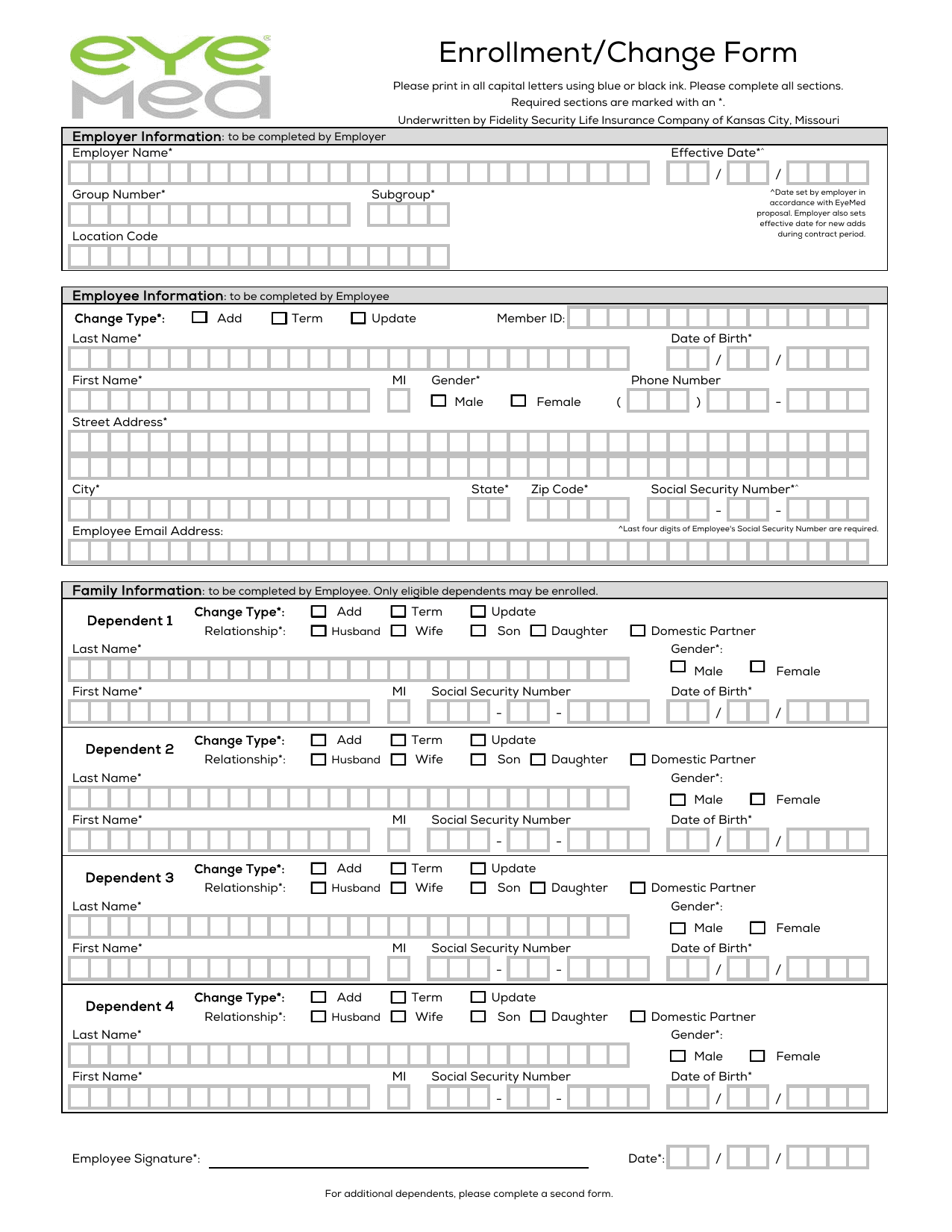
The Scenario: The EyeMed form. The PDF code labels phone number parts as undefined_5. The visual screenshot clearly shows a box for digits.
When we told the model exactly which field ID to fill (Fieldname task), it scored 100%. When we gave it semantic instructions ("Fill the phone number"), accuracy dropped to 71.7%, a 28.3-point gap.
Of that gap, 99.6% were "empty" errors. The model could often (not always) identify fields in the screenshot and plan to fill them. The confusing metadata labels seemed to win out, but without any explicit reconciliation between the two signals.
Visual Reasoning
For simpler forms like the rental application, screenshots helped models jump from 70.5% to 90.6% field accuracy. But the prescription form told a different story.
The Stat: Even with screenshots, the strict pass rate was a dismal 3.1%.
The Logic Check: Unlike the Rental form, partial credit didn't even help here. The "field correctness" only nudged up by 4.6% (from 88% to 92%).
The "Why": The Prescription form relies on implicit business logic.
The model can see the boxes. What it misses are the implicit constraints: that filling one section means checking a box nearby, or that choosing the left column means leaving the right one blank. These rules are encoded in layout, not labeled anywhere.
Below we dive deeper into the specific failure patterns we observed.
Failure Mode Deep Dive
Analyzing thousands of agent traces revealed three main failure patterns that persist even when models achieve high field-level accuracy.
Field Mapping: Semantic → Opaque
Users describe fields naturally - "Company Email", "Bank Account Number" - but PDF forms use programmatic names like Text Field 720 that bear no semantic relationship to their purpose.
The model correctly identified all three values but placed them in the wrong fields. Spatial proximity combined with meaningless field names made distinguishing fields impossible.
Implicit Logic: Business Rules Encoded in Layout
This is where things get interesting. PDF forms encode business rules through visual layout (sections, groupings, conditional dependencies) rather than explicit labels. Models must infer these rules from spatial relationships and domain knowledge, and this is where they fail most catastrophically.
Consider what a human implicitly understands when filling out a prescription form: checking the "AllianceRx Walgreens" pharmacy option means you've chosen a specialty pharmacy, which requires prescriber attestation. Selecting one medication dosage means leaving the other dosage options blank. These rules are never written down. They're encoded in how the form is organized.
The agent filled 46 of 49 fields correctly. But the 3 fields it missed weren't random. They form a logical dependency chain:
Why this matters: The prescription form had a 3.1% strict pass rate even with screenshots enabled. Field accuracy only improved from 88% to 92%, a mere 4.6 point gain. The model can see the checkboxes. What it can't do is infer that checking one box logically requires checking another.
This pattern appears across form types. Medical consent forms have witness signatures that only apply if the patient can't sign. Tax forms have sections that become mandatory based on earlier selections. Insurance enrollment has coverage tiers where selecting one option invalidates others. These dependencies are obvious to humans who understand the domain. They're invisible to models that process fields independently.
Spatial Reasoning: Adjacent Field Confusion
When multiple semantically similar fields appear within 50-100 pixels of each other, models confuse their positions. This is especially problematic for financial data (routing vs. account numbers), address components, and date fields.
What This Means
PDF form filling sits at the intersection of vision, reasoning, and structured data manipulation. Current frontier models can achieve impressive field-level accuracy, but production deployment requires near-perfect reliability. The gap between 93% accuracy and 100% represents billions of dollars in manual review, error correction, and compliance risk.
The path forward likely involves hybrid approaches: using model capabilities for understanding and planning while building robust tooling for execution. Until then, PDFBench provides a clear benchmark for measuring progress on one of automation's most stubborn frontiers.
Happy to chat to give more details, book a call.